

A Field Operations App connects your dispatchers, technicians, and back office in one live workflow. The best platforms replace spreadsheets, whiteboards, and disconnected mobile tools with a single system your teams share. Service organizations gain faster response, cleaner data, and stronger margins from the same headcount.
Field service leaders reach the same crossroads once their team grows past a few vans. According to Field Service Software IO research, businesses using field service tools report cost reductions of 14 to 18%. The sections below unpack what a Field Operations App does, who uses it, and where the value shows up.
What Is a Field Operations App and Why Does It Matter?
A Field Operations App is a mobile-first platform that connects field crews with dispatch and back office. It handles scheduling, work orders, checklists, photos, signatures, time tracking, and reporting inside one connected workflow. Service organizations use it to cut coordination waste and turn field data into faster invoicing and stronger margins.
What a Modern Field Operations App Actually Does
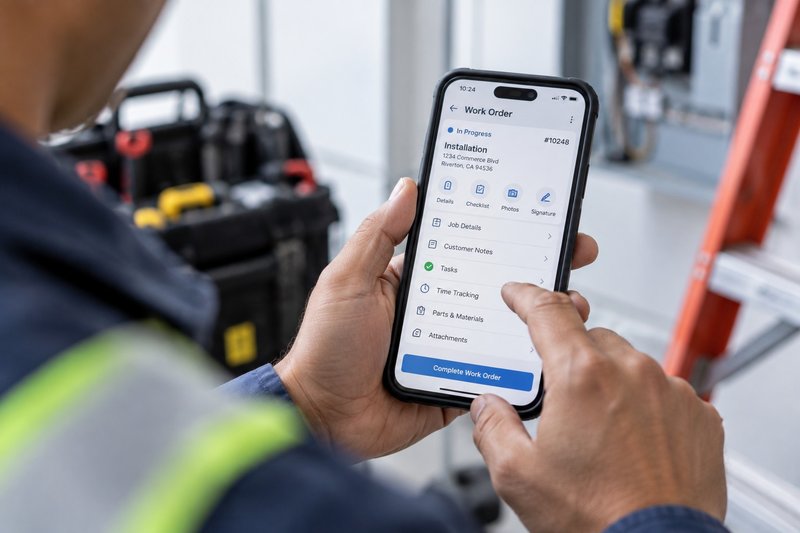
A modern Field Operations App gives every role in your service business one shared view of the day. Dispatchers see a live board of jobs, and technicians see full details on their phone. Meanwhile, finance and project managers see closeouts as they happen instead of waiting for reports.
Think of a residential HVAC company running 30 service calls a day across 10 vans. In place of texts and voicemails, the app shows every job status, arrival window, and note.
According to Fieldproxy scheduling analysis, dynamic scheduling can cut average job completion time by 18% across service teams. As a result, one dispatcher can run a route that used to take two people on phones.
The most common capabilities inside a modern platform include the following core building blocks:
- Drag-and-drop scheduling and real-time dispatch across every crew, job, and route in your day
- Mobile work orders with checklists, photos, signatures, and time tracking on the technician's phone
- Offline mode so your technicians can work in basements, rural areas, and other spotty zones
- Live sync to your ERP so field data flows into payroll, billing, and reporting without duplicate entry
- Dashboards that let managers track jobs, technicians, and project margins throughout the day
In practice, each capability solves a coordination problem that used to eat hours from your service organization. For a deeper look, see our guide on features every modern platform should include.
Who Uses Field Service Software and Where Does It Fit
A Field Operations App fits any business where work happens away from the office and needs coordination back. Contract furniture dealers use it for installations, HVAC firms for service calls, and AV shops for rollouts. In each case, crews on the move need back office teams and customers waiting for updates.
Industries where the value shows up fastest tend to share three traits across their daily operations. In practice, field crews handle scheduled work, back office teams need clean data, and customers expect updates. As a result, the friction of coordinating across those three groups compounds fast as a service team grows.
Contract furniture dealers see the payoff on install day, when punch lists and client sign-offs move to the phone. Meanwhile, HVAC and plumbing teams gain the ability to reroute technicians when a call runs long onsite.
Construction and contracting teams use the same workflow to track site work, safety checklists, and change orders in real time. Industrial equipment techs and audio-visual installers gain the same visibility across preventive maintenance, urgent repairs, and multi-site rollouts. Each of these teams benefits from the same core loop: live scheduling, mobile execution, and closeout that flows to finance.
For an industry example, see how Perception Marketing transformed AV project field service.
How Field Service Software Delivers Business Value
The business case for a Field Operations App comes down to three outcomes leaders can measure in 90 days. You gain visibility into the field, capacity for more work, and speed from job completion to invoice. Each outcome shows up in numbers your finance team already tracks each quarter.
Visibility is the first change most leaders feel once the platform goes live across the operation. In place of end-of-week reports, project managers see labor, materials, and status updates as work happens.
As a result, small overruns get caught before they turn into large ones on the job. Capacity comes next, because one dispatcher can now run a route that used to take two people on the phones.
Meanwhile, technician productivity climbs because job details, forms, and history live on the phone throughout the day. Invoicing then accelerates, since closeout data reaches finance the same day the job is actually completed. Project margins improve because change orders and scope creep get caught in real time on the job itself.
Together, these outcomes shift your service organization from reactive coordination to proactive control on every job. For related reading, see our guides on streamlining dispatch to completion and on project profitability.
Ready to Explore Field Operations for NetSuite?
ERP Success Partners helps NetSuite users evaluate, deploy, and extend platforms like Field Operations Pro inside their business. Our team helps you map current gaps, weigh the options, and plan a rollout that fits. To see how a connected field workflow could work for your business, talk with our team today.