
Commission Pro
Solving NetSuite Commission Management Challenges
Controlled Finance Process
All Commissions Managed in NetSuite
Better visibility across Finance and Sales
A clearer way to manage exceptions
Commission Scenarios Supported
Flat percentage
Tiered
Revenue-based
Margin-based
Customer-specific
Territory-based
Team and group
Split
Bonus and incentive
Multi-level hierarchy
Executive override
Subscription renewal
Recurring billing
Credit/Return/Cancellation
Refund/Contract-change
Write-off corrections
Who Uses Commission Pro
Finance & Accounting
Sales Operations and Revenue Operations
Sales Leadership
Review goal attainment, team performance, rankings and projected commission information while participating in defined approval processes.
Sales Representatives
Access pending commissions, earnings statements, paid history, dashboards and goal-attainment tracking without relying exclusively on Finance.
Reporting & Visibility
See the Complete Commission Picture
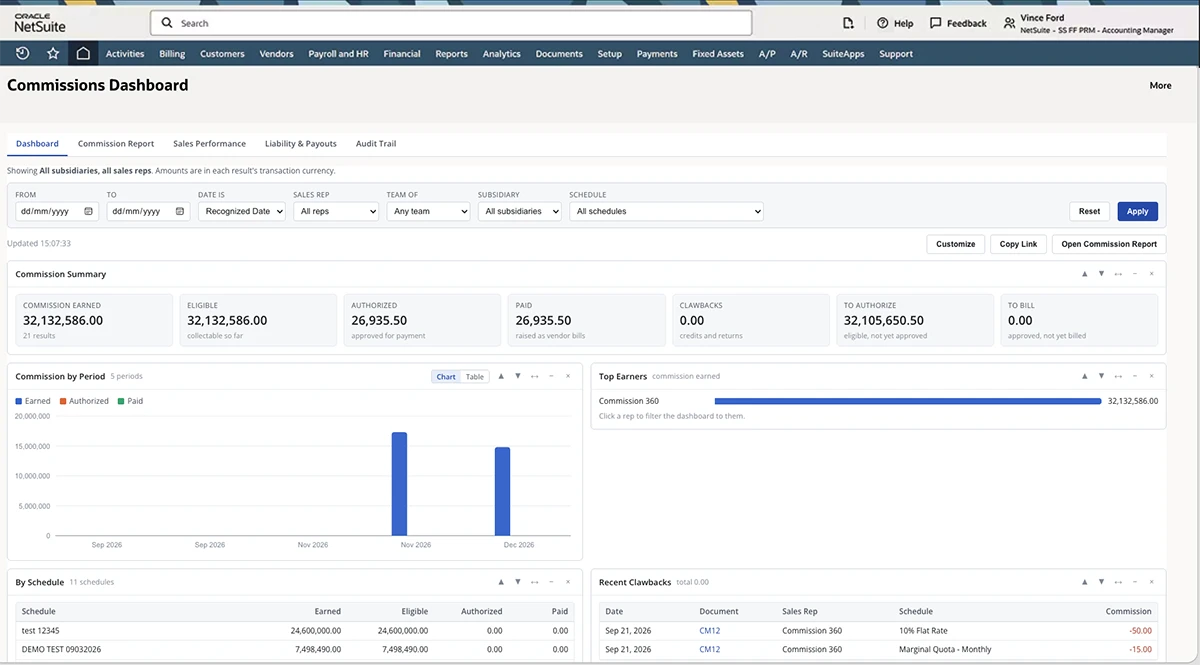
Monitor earned, eligible, authorized and paid commissions from one dashboard. Review amounts awaiting authorization or billing, track results by period and schedule, and see top earners and recent clawbacks.
Review Commission Results in Detail
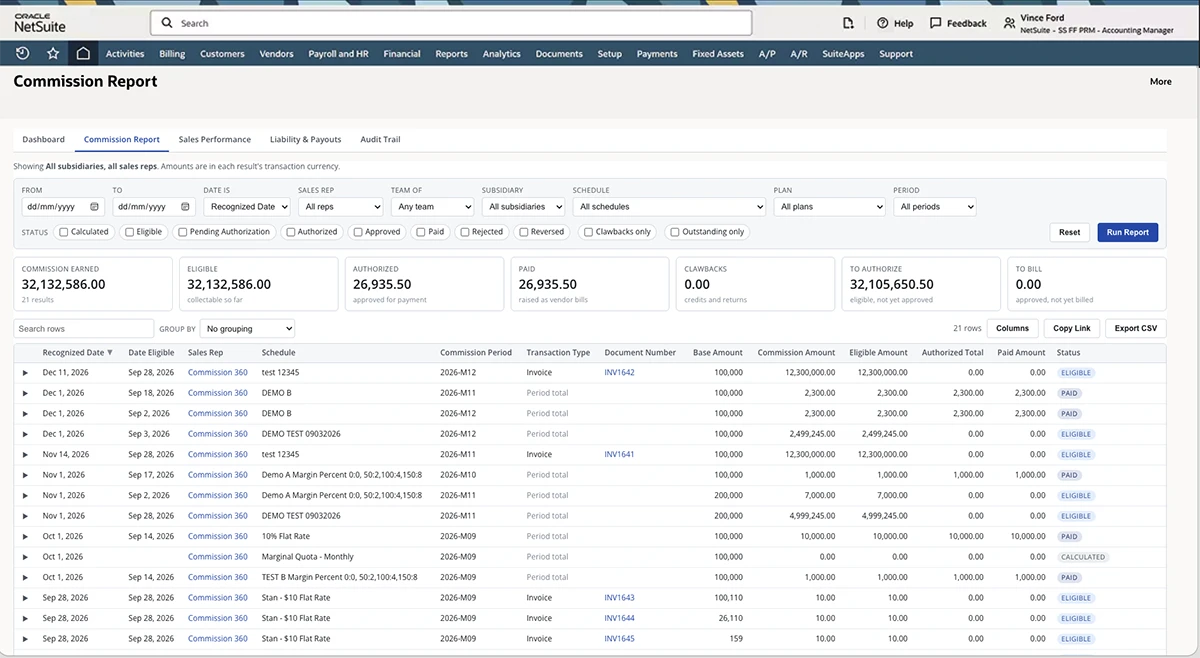
Filter commission results by date, sales representative, team, subsidiary, schedule, plan, period and status. Review the amounts associated with each result and export the report for further analysis.
Trace Commissions to Their Transactions
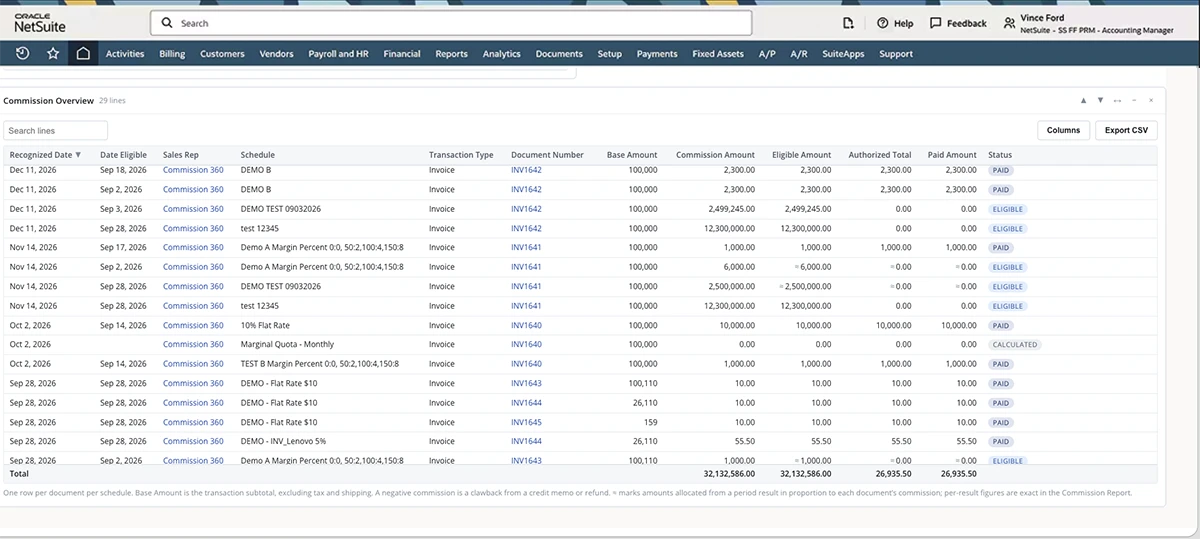
See recognized and eligible dates, sales representatives, commission schedules, transaction types, source documents and commission amounts together. Follow each result through its calculated, eligible, authorized and paid status.
Understand Outstanding Commission Obligations
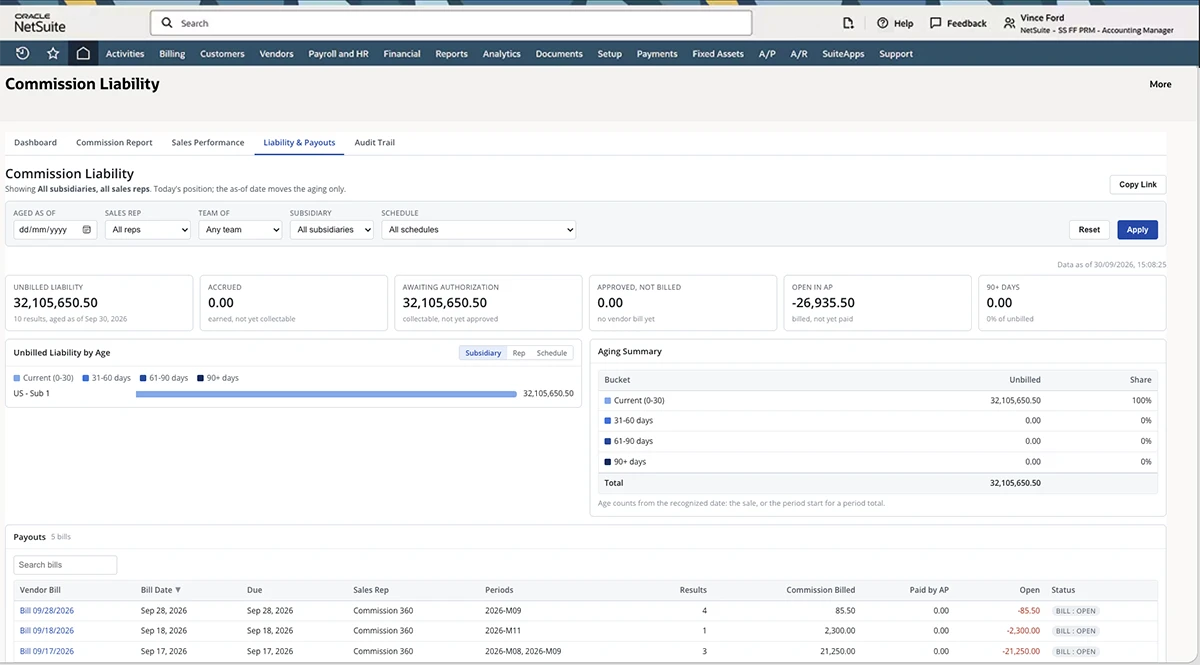
See unbilled liability, accrued commissions, amounts awaiting authorization, approved amounts not yet billed and commissions open in Accounts Payable. Review liability by age, subsidiary, representative or schedule.
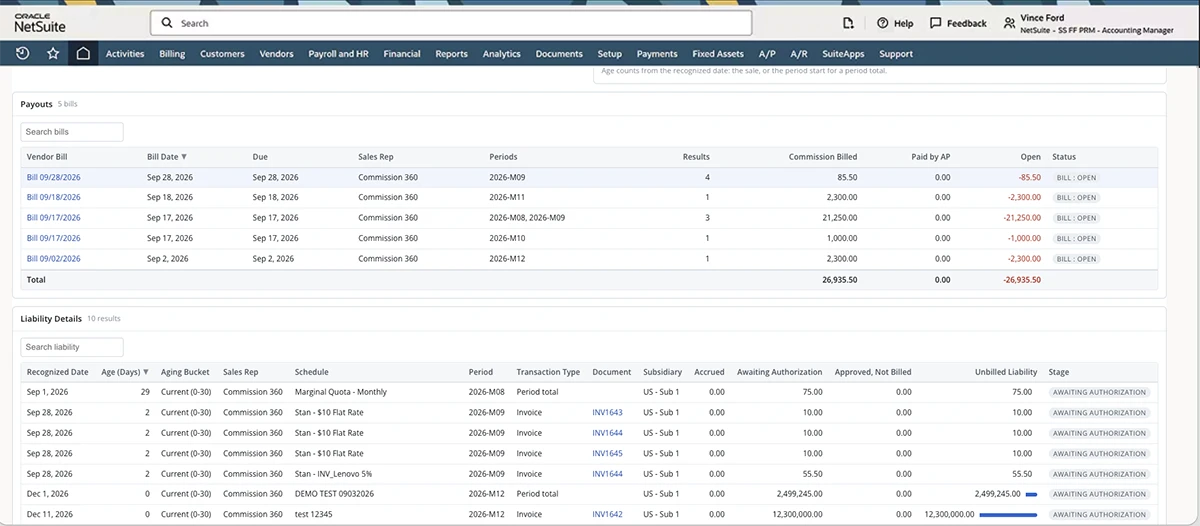
Prepare Commissions for Payment by Finance
Review the vendor bills created for approved commissions, including bill dates, due dates, commission periods, billed amounts, amounts paid through Accounts Payable and remaining open balances.
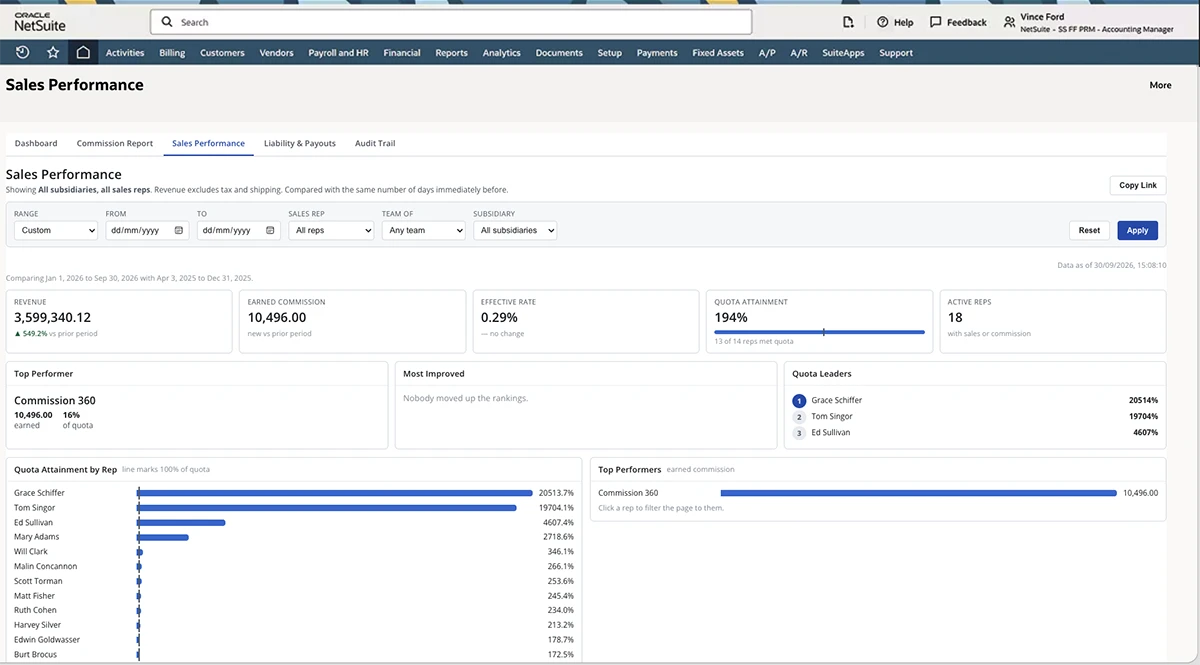
Connect Commission Results With Sales Performance
View revenue, earned commissions, effective commission rates, quota attainment and active representatives together. Identify top performers, quota leaders and changes in sales performance over time.
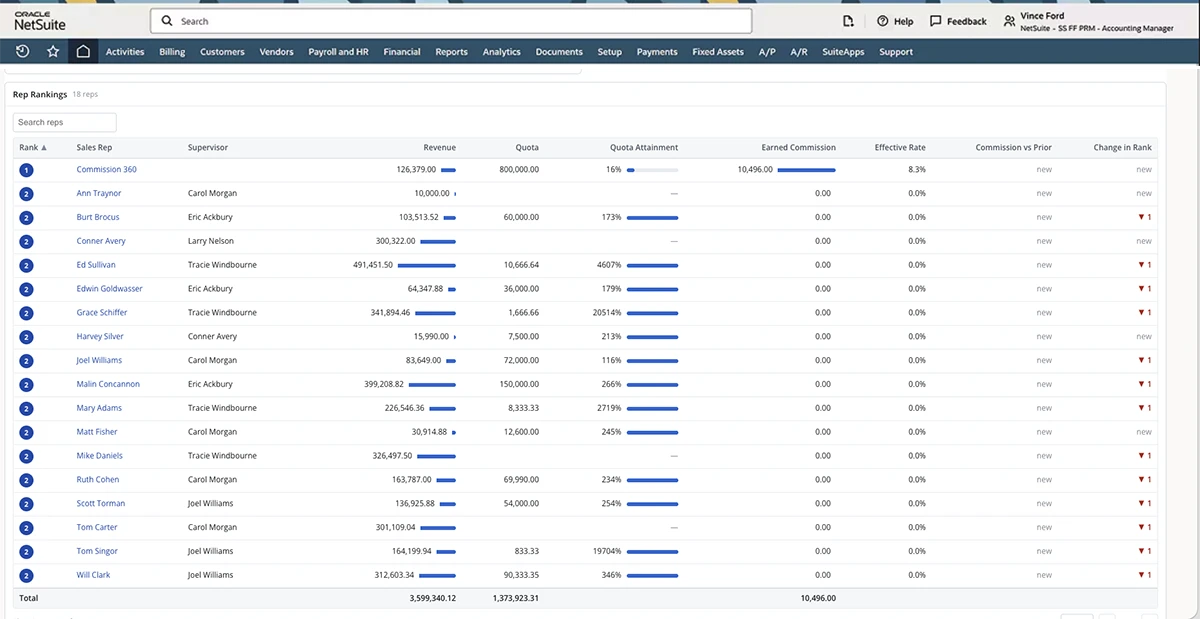
Compare Sales Representative Performance
Compare sales representatives based on revenue, quota attainment, earned commissions and effective commission rates. See changes in ranking and identify the representatives leading the team.
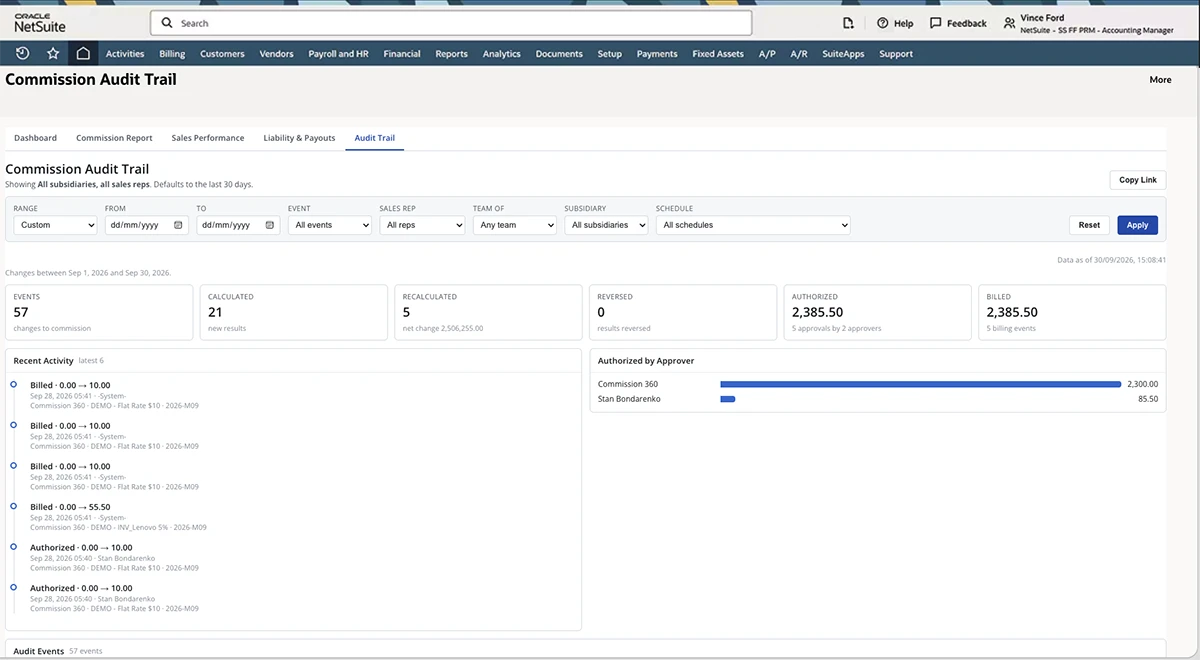
Review Commission Activity and Changes
Follow calculated, recalculated, reversed, authorized and billed commission events. Review recent activity, authorization details and changes associated with each commission result.
How Commission Pro Works
1. Start with the Business Event
2. Apply the relevant commission plan
3. Calculate & Allocate
Calculate commissions and allocate supported amounts across sales representatives, account executives, managers, regional leaders, business-development teams and executive overrides.
4. Review exceptions and approvals
5. Give each audience the right view
6. Handle Later Changes
Apply supported commission corrections associated with credit memos, returns, cancellations, refunds, contract changes and write-offs.
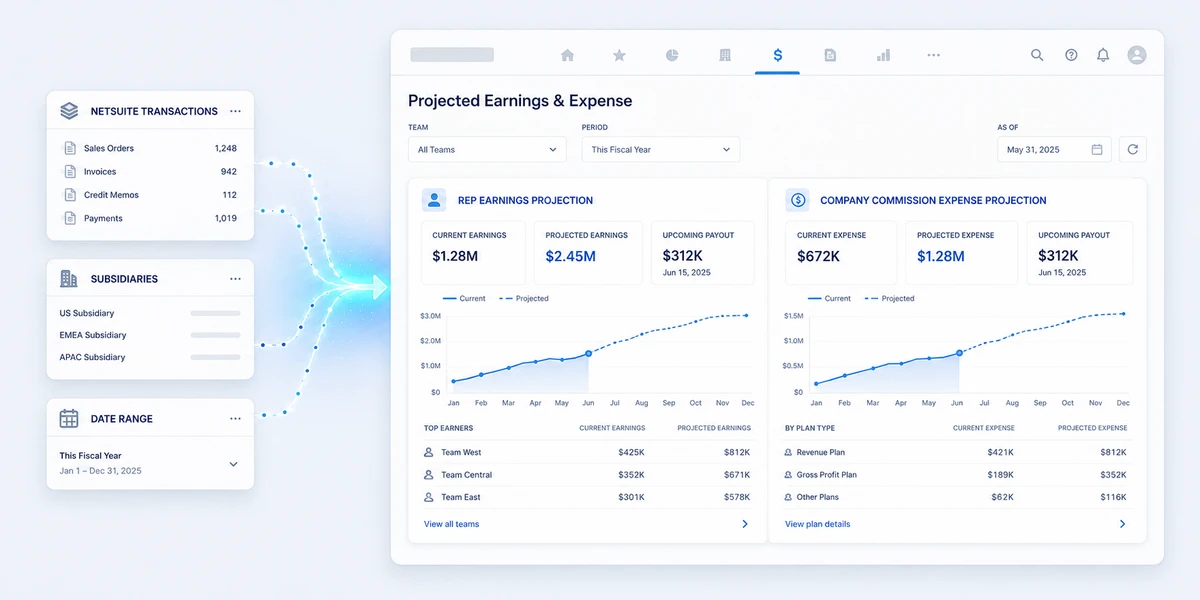
Stay Within NetSuite

“Commission Pro gives NetSuite customers a more controlled and transparent way to manage sales commissions. By connecting commission activity to the transactions already in NetSuite, Finance can manage calculations, approvals, liabilities and payment preparation with greater visibility.”
JC. Partner, ERP Success Partners.
Has your commission process become a system of its own?

FAQs
What is CommissionPro NetSuite commission management software?
It is software used to configure, calculate, review and report sales commissions in connection with NetSuite. CommissionPro is built on the NetSuite platform and supports the specific plan types, transaction triggers, approvals, forecasts and rep views described on this page.
Can CommissionPro replace our commission spreadsheets?
Which transactions can trigger calculations?
Does it support tiered and split commissions?
Can it handle returns and commission corrections?
The product supports corrections related to credit memos, returns, cancellations, refunds, contract changes and write-offs.
What can sales representatives see?
The portal experience includes commission dashboards, earnings statements, pending commissions, paid history and goal-attainment tracking. Exact refresh timing requires confirmation.
Does it support multiple subsidiaries and currencies?
Multi-subsidiary and multi-currency support. Detailed currency conversion and cross-subsidiary behavior should be validated for each customer.
How does it compare with NetSuite Incentive Compensation?
NetSuite Incentive Compensation module is subject to being decommissioned in 2029 by Oracle. CommissionPro is an alternative NetSuite commission management solution offered by ERP Success Partners.
How does it compare with standalone platforms?
Standalone platforms may provide broader enterprise compensation planning, data integration, modeling and AI capabilities. CommissionPro is strongest when a customer values a focused commission process built on NetSuite and aligned with NetSuite transaction and reporting context.