
Notes de version CFI Suite™ 2026.1

Notes importantes
Les améliorations et modifications de la version 2024.2 énumérées dans ce document peuvent ne pas être disponibles pour tous les clients jusqu'à ce que leur mise à niveau soit finalisée. Votre accès à ces fonctionnalités et applications est soumis aux conditions de service de votre contrat NetSuite et de votre contrat ERP Success Partners. Certaines fonctionnalités peuvent nécessiter un achat supplémentaire.
Vous pouvez cliquer sur le bouton ci-dessous pour télécharger la version PDF des notes de version de CFI Suite 2026.1.
Déclaration de confidentialité
Ce document contient des informations exclusives et confidentielles de ERP Success Partners Inc. fournies dans le seul but de permettre au destinataire d'évaluer les informations relatives à l'utilisation de CFI Suite™ et à ses questions connexes. En contrepartie de la réception de ce document, le destinataire accepte de maintenir ces informations strictement confidentielles et de ne pas les reproduire, les divulguer ou les distribuer à quiconque en dehors du groupe directement responsable de l'évaluation de son contenu, sans l'autorisation écrite expresse de ERP Success Partners Inc. L'utilisation ou la divulgation de ce document, en tout ou en partie, à des fins autres que la poursuite d'une relation d'affaires avec ERP Success Partners Inc. est expressément interdite. Tout destinataire de ce document qui n'est pas disposé à accepter ces restrictions doit renvoyer ce document et les autres documents envoyés en addendum qui sont la propriété de ERP Success Partners Inc. et qui sont joints électroniquement ou qui font partie des annexes, sans en examiner le contenu ni en faire une distribution ultérieure. L'examen de ce document vaut acceptation des restrictions susmentionnées.
Liste des versions du produit
| Nom de la SuiteApp | Numéro de la dernière version |
| Exportateur XML pour AIS (Nouveau) | 26.1.0 |
| Line Import Tool | 26.1.0 |
| Multi Line Edit Tool (MLET) | 26.1.0 |
| PDF Builder | 26.1.0 |
| Connecteur Haworth | 26.1.0 |
| Connecteur Teknion | 26.1.0 |
| Order Adjustments | 26.1.0 |
| Groupe de travail sur les OP | 26.1.0 |
| Project Insights | 26.1.0 |
| Adresses CFI | 26.1.0 |
| Field Operations Pro [NetSuite] | 26.1.11 / 26.1.12 |
| Field Operations Pro [Application mobile] | 1.4.2 |
Avis important :
Ce document couvre les informations de mise à jour concernant uniquement CFI Suite™. Tous les clients doivent être mis à niveau vers NetSuite 2025.2 avant d'être mis à niveau vers CFI Suite™ 2025.2 afin de garantir une transition de mise à niveau fluide. Plus d'informations concernant les fonctionnalités publiées par NetSuite se trouvent ici.
1.0 Nouvelle SuiteApp
1.1 Exportateur XML pour AIS
Présentation du Exportateur XML pour AIS SuiteApp, qui permet aux utilisateurs de générer et de télécharger des données de bons de commande au format XML OFDA conforme à la norme AIS. Cette amélioration prend en charge les exigences de soumission électronique des commandes pour le AIS fournisseur, contribuant à rationaliser le traitement des commandes, à améliorer l'exactitude des données et à réduire l'effort manuel lors de l'échange d'informations sur les bons de commande.
Principales caractéristiques
- Fonctionnalité d'exportation XML :
Une nouvelle “Exporter en XML” le bouton est désormais disponible sur l'enregistrement du bon de commande. Lorsqu'il est activé, le système génère et télécharge un fichier XML formaté selon les normes AIS OFDA.

- Mappage XML configurable
Un enregistrement de configuration dédié permet aux administrateurs de définir et de gérer les correspondances de champs XML. Cela offre la souplesse nécessaire pour répondre aux exigences spécifiques de l'AIS et aux futurs ajustements de correspondance sans modification du code.

Limitation actuelle
- AIS prend actuellement en charge téléchargement manuel du fichier XML uniquement. Cette version se concentre sur la génération et le téléchargement de fichiers XML. La transmission automatisée ou l'intégration par API n'est pas incluse à ce stade.
2.0 CFI Suite™ Mises à jour
Outils de productivité CFI
2.1 Outil d'importation de lignes (LIT)
2.1.1 Mappage des comptes COGS au niveau du fabricant
Lorsqu'ils sont définis, les éléments nouvellement créés utiliseront le compte configuré au lieu d'utiliser le modèle d'élément par défaut, offrant ainsi plus de souplesse et de précision dans l'affectation des comptes financiers.

2.2 Multi Line Edit Tool (MLET)
2.2.1 Optimisation pour MLET
Améliorations des performances mises en œuvre pour Fenêtre pop-up MLET pour améliorer les temps de chargement et l'évolutivité, avec un accent principal sur la réduction des surcharges liées à la récupération des données dorsales.
Les tests de performance sur de petites et de grandes commandes clients ont démontré que la récupération des données était le principal facteur de la latence de MLET. Bien que les optimisations du chargement des scripts aient apporté des améliorations mesurables pour les transactions plus petites, les gains les plus significatifs ont été obtenus grâce à des améliorations de l'accès aux données et de la logique de traitement.
Améliorations des performances
- Optimisation de la récupération et du traitement des données du backend pour améliorer la réactivité lors de transactions importantes.
- Amélioration de l'évolutivité en réduisant considérablement l'impact des lignes de commandes clients supplémentaires sur les temps de chargement des fenêtres contextuelles.
- Performances améliorées lors de la mise à jour de plusieurs lignes de formulaire.
2.2.2 Autorisations de modification de champs basées sur les rôles
Ajout de la prise en charge des autorisations de modification de champs basées sur les rôles dans les configurations de Paramétrage.
Les administrateurs peuvent désormais contrôler quels rôles d'utilisateurs sont autorisés à modifier des champs spécifiques. Cette amélioration contribue à renforcer la gouvernance des données en garantissant que les champs sensibles, tels que les coûts des produits, ne peuvent être modifiés que par le personnel autorisé tout en restant visibles pour les autres utilisateurs selon les besoins.


2.3 PDF Builder
PDF Builder amélioré avec des optimisations concernant la gestion des adresses, la souplesse des modèles, la prise en charge des images et la présentation des documents.
2.3.1 Améliorations du mappage des adresses
- Mise à jour de PDF Builder pour récupérer l'adresse du concessionnaire à partir du champ d'adresse d'expédition de la filiale (adresse de livraison), garantissant que les documents PDF générés affichent la bonne adresse de livraison de la filiale.

- Mise à jour de la configuration de l'étiquette de l'adresse de livraison pour utiliser le bon champ (custbody_esp_ship_to_address), garantissant que les modèles affichent la valeur d'adresse de livraison souhaitée.
2.3.2 Prise en charge des images
- Ajout de la prise en charge des champs d'image dans les modèles PDF Builder, permettant aux utilisateurs de

2.3.3 Dimensions d'image configurables dans PDF Builder
PDF Builder prend désormais en charge des dimensions d'image configurables via PDF Builder Setup, offrant un meilleur contrôle sur la taille et la présentation des images dans les documents générés. Cette amélioration permet aux utilisateurs de personnaliser les paramètres d'affichage des images pour mieux les aligner sur la mise en page de leur document et leurs exigences en matière de marque.

2.3.4 Flexibilité du mappage des champs
- Ajout de fonctionnalités de correspondance de champs à PDF Builder, permettant aux utilisateurs d'associer leurs champs NetSuite préférés aux champs pris en charge par PDF Builder.
- Offre une plus grande flexibilité lors de la configuration des modèles de documents et des sources de données sans nécessiter de personnalisation des modèles.

2.3.5 Améliorations de la mise en page des documents
- Optimisation de la mise en page de l'en-tête du PDF en réduisant les espaces blancs inutiles dans la section d'en-tête, ce qui donne une présentation de document plus propre et plus professionnelle.

Connecteurs CFI 2.4
1.5.1 Indicateur de fonctionnalité – Empêcher la synchronisation lorsqu'un prépaiement fournisseur existe sur le bon de commande associé
2.4.1.1 Améliorations des performances de traitement des accusés de réception
Amélioration du flux de traitement des accusés de réception pour optimiser les performances globales et l'efficacité de la gestion des transactions.
Les principales améliorations comprennent :
- Logique de mise à jour des transactions optimisée pour réduire le temps de traitement.
- Mises à jour automatiques des détails des transactions associées lors du traitement des accusés de réception.
- Synchronisation des données d'accusé de réception des bons de commande (BC) et des commandes clients (CC) lorsque la fonctionnalité est activée.
- Marquage automatique des accusés de réception traités avec succès comme liés.
Ces améliorations offrent un traitement plus rapide, une cohérence des données améliorée et une meilleure visibilité sur le statut des accusés de réception pour l'ensemble des transactions associées.
2.4.1.2 Ajouter un champ Emplacement du concessionnaire dans l'enregistrement du partenaire Haworth
Pour aider les concessionnaires possédant plusieurs sites, il leur serait utile d'identifier le partenaire Haworth qui correspond à un site spécifique.
Ceci permet d'éviter les erreurs lors de la soumission de commandes via les services web.

2.4.1.3 Supprimer la logique de demande de nouveau partenaire du processus de soumission de commande
Les concessionnaires ont actuellement la possibilité de soumettre Demandes de nouveaux partenaires à travers Soumission de commande fonctionnalité.
Cette fonctionnalité n'est plus requise et doit être déprécié comme Haworth a abandonné le processus.
2.4.1.4 Nouvel identifiant pour la soumission d'une nouvelle adresse de partenaire
Une case à cocher d'identifiant d'adresse personnalisé a été introduite pour les nouvelles demandes de partenaire afin de garantir que la bonne adresse est utilisée pour la création du partenaire Haworth au lieu de dépendre uniquement de l'adresse de livraison par défaut.
Cette amélioration réduit le risque d'attribution de taxes incorrectes pour les revendeurs lorsque l'adresse fiscale diffère de l'adresse de livraison par défaut.
2.4.1.5 Création automatique d'enregistrements de partenaires pour les adresses de partenaires Haworth
Une nouvelle Lien vers l'adresse de Haworth action a été ajoutée à Client enregistrement. Lorsque vous cliquez dessus, le système en crée automatiquement un nouveau Partenaire Haworth enregistrement, l'associe au client sélectionné et synchronise les informations avec l'intégration Haworth.

Les avantages comprennent :
- Permet aux utilisateurs de créer et de lier des enregistrements Haworth Partner directement à partir de l'enregistrement Client.
- Élimine la nécessité de créer manuellement des enregistrements de partenaires Haworth avant la synchronisation.
- Établit automatiquement la relation entre l'enregistrement du Client et celui du Partenaire Haworth.
Connecteur Teknion 2.4.2
2.4.2.1 Amélioration de la mise à jour automatique de la date d'expédition
Ajouté un nouveau Mise à jour automatique de la date d'expédition indicateur de fonctionnalité dans les paramètres Teknion pour rationaliser la gestion des dates de bon de commande lors du traitement des accusés de réception.
Lorsqu'elle est activée, cette solution remplira automatiquement la date d'expédition du bon de commande à partir de la date d'expédition de l'accusé de réception lors de la récupération de ce dernier, à condition que la date d'expédition du bon de commande soit actuellement vide.
Cette amélioration prend également en charge le mappage de champs configurable, permettant aux clients de mapper la date d'expédition de l'accusé de réception au champ de date d'expédition du bon de commande de leur choix et de s'adapter aux personnalisations spécifiques au compte.
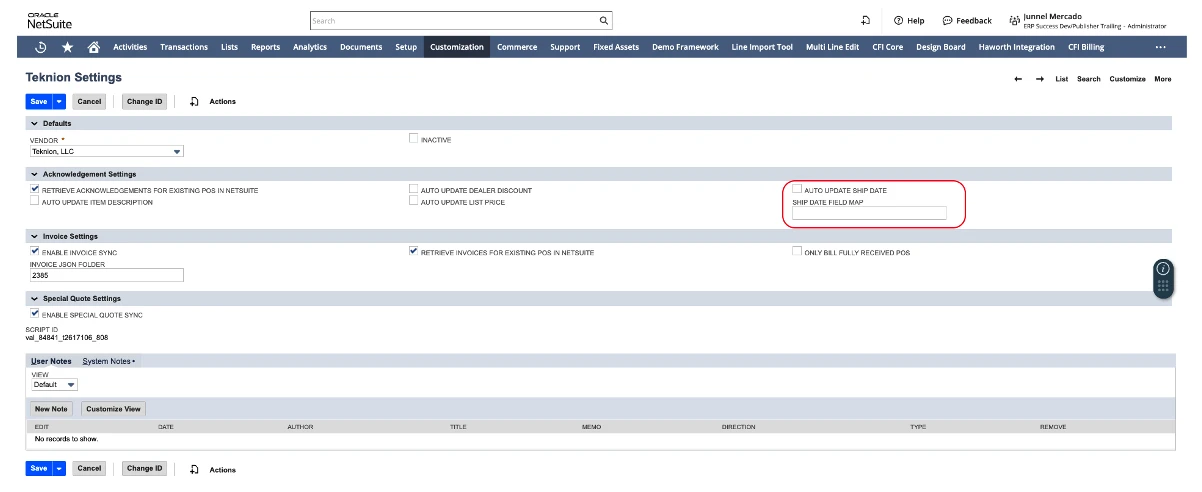
Si l'utilisateur active la mise à jour automatique de la date d'expédition, le mappage du champ de la date d'expédition sera également disponible pour associer n'importe quel mappage de champ (champ de date) sur la source souhaitée. Sinon, l'utilisateur peut laisser le champ vide et il sera automatiquement associé au champ de date d'expédition de l'accusé de réception (custbody_cfi_ack_ship_date).
Avantages
-
- Réduit les mises à jour manuelles des dates d'expédition des bons de commande.
- Améliore la cohérence des données entre les accusés de réception et les bons de commande.
- Prend en charge les configurations de champs de date d'expédition de bon de commande spécifiques au client grâce à des options de mappage flexibles.
2.5 Outils de gestion des commandes CFI
2.5.1 Order Adjustments
2.5.1.1 Améliorations de la compatibilité des champs de bon de commande liés
Amélioration de la gestion de Bon de commande lié champ pour mieux prendre en charge les processus métiers existants, les intégrations et les exigences de reporting.
Cette mise à jour préserve la compatibilité pour les modules et les flux de travail clients qui dépendent du champ Bon de commande lié, notamment :
- Direct Billing processus
- Fonctionnalité de ventilation des bons de commande
- Visibilité des bons de commande dans les rapports clients et les recherches mémorisées
Ces améliorations contribuent à garantir la continuité des flux de travail existants tout en maintenant des liens et des rapports précis entre les transactions associées.
2.5.1.2 Afficher le champ de correspondance croisée

Amélioration du tableau de mise en correspondance des champs sur la page des Order Adjustments pour afficher toutes les correspondances configurées et inclure une colonne Type de mise en correspondance qui distingue les correspondances standard et inter-niveaux.
2.5.2 Réunion de ventilation du PO
2.5.2.1 Optimisation des performances des ruptures de PO
Optimisé le Groupe de travail sur les OP processus lors du chargement de la page Commande client, améliorant considérablement les performances et la réactivité du système.
L'amélioration réduit le temps d'exécution de la ventilation des bons de commande d'environ de 4,7 secondes à 1,7 seconde, ce qui entraîne un chargement plus rapide des commandes clients et une expérience utilisateur plus fluide.
Avantages
- Performance et réactivité de la page Commande client améliorées.
- Temps de traitement réduit pour les opérations de ventilation de bons de commande.
- Expérience utilisateur améliorée lors du traitement des commandes client.
- Aucune modification de la fonctionnalité existante de génération de bons de commande ou des processus métier.
2.6 Données financières
2.6.1 Analyses de projets
2.6.1.1 Améliorations du calcul des réalisés de PI
Ajout d'une nouvelle logique qui permet au système d'afficher le prix de vente et le coût réels dérivés à la fois des factures clients et des factures fournisseurs. Cette amélioration garantit que le coût réel est affiché quel que soit le statut actuel du bon de commande, fournissant ainsi des informations financières plus complètes et précises.
- Si une ligne de commande client est associée à une facture client, la vente enregistrée sur cette facture apparaîtra dans le tableau des Réels. Cette inclusion se produit quel que soit l'état actuel de la commande client ou du bon de commande lié à cette ligne. En d'autres termes, même si la commande client ou le bon de commande n'est pas encore terminé ou se trouve dans un état en attente, la vente facturée sera tout de même reflétée dans le tableau des Réels sans exception.
- Si une ligne de bon de commande est associée à un facture fournisseur, le coût de cette facture apparaîtra dans le tableau des coûts réels. Cela se produit quel que soit l'état actuel du bon de commande lui-même, ce qui signifie que le coût réel est enregistré même si le bon de commande est toujours ouvert, partiellement facturé ou dans tout autre état.
- Activez ou désactivez cette fonctionnalité sur la page de configuration de Project Insight.

Avantages
- Amélioration de l'exactitude et de l'exhaustivité des rapports sur les coûts du projet.
- Une plus grande visibilité sur les coûts réels de toutes les commandes clients.
- Calculs de coûts cohérents, indépendamment du bon de commande ou du statut de facturation.
Base CFI 2.7
2.7.1 Adresses CFI
2.7.1.1 Routage flexible de l'expéditeur-destinataire pour les bons de commande
Ajout d'une nouvelle fonctionnalité qui permet aux utilisateurs de créer et de spécifier une adresse de livraison personnalisée à la volée, même lorsque l'adresse n'est pas incluse dans les options de tournée d'expédition prédéfinies. Cela offre une plus grande flexibilité pour la gestion de destinations de livraison uniques sans nécessiter de configuration préalable de tournée d'expédition.

De plus, les utilisateurs ont désormais la possibilité de modifier l'adresse d'un itinéraire d'expédition sélectionné, ce qui offre une plus grande flexibilité et un meilleur contrôle sur les détails d'expédition.

Avantages
- Prend en charge des flux de travail d'expédition flexibles pour différents scénarios commerciaux.
- Réduit les mises à jour manuelles des informations d'expédition des bons de commande.
- Permet des configurations de routage spécifiques au client sans nécessiter de développement personnalisé.
- Améliore la précision et la cohérence de l'attribution de la destination d'expédition.
2.8 Field Operations Pro [NetSuite]
2.8.1 Améliorations de l'ordonnanceur
2.8.1.1 Visibilité améliorée des projets et des commandes client
Les informations relatives aux projets et aux commandes clients sont désormais affichées directement dans le Planificateur, offrant ainsi aux régisseurs et aux chefs de projet une meilleure visibilité sur les enregistrements sources de chaque événement. Cela réduit la nécessité de naviguer entre les différents enregistrements lors de la révision des planifications et améliore la traçabilité tout au long du processus de planification.
2.8.1.2 Planification des ressources à la journée partielle
Les affectations de ressources prennent désormais en charge la planification sur des journées partielles. Au lieu de bloquer toute la journée d'un employé, seules les heures allouées à un événement sont réservées. Cela permet une utilisation plus précise des ressources et offre aux planificateurs la possibilité de maximiser la disponibilité de la main-d'œuvre.
2.8.1.3 Filtrage de la disponibilité des actifs
Les fonctionnalités de filtrage des actifs du planificateur ont été améliorées pour n'afficher que les actifs dont les quantités sont disponibles. Cela permet d'éviter les conflits de planification et aide les équipes à identifier rapidement les équipements prêts à être affectés.

2.8.1.4 Tri des événements et des tâches par date
Les emplois et les événements disponibles peuvent désormais être triés par date, ce qui permet aux planificateurs de prioriser plus facilement les travaux à venir, d'identifier les activités en retard et de gérer les charges de travail plus efficacement.

2.8.1.5 Filtrage d'accès basé sur les divisions
Les organisations qui utilisent des divisions peuvent désormais limiter automatiquement la visibilité pour les utilisateurs non administratifs. Les ressources, les bons de travail et les événements sont filtrés en fonction de la division attribuée à l'utilisateur, y compris toutes les divisions enfants ou sous-divisions, ce qui permet de maintenir des vues de planification plus épurées tout en garantissant que les utilisateurs ont accès à tous les enregistrements pertinents au sein de leur hiérarchie organisationnelle.
2.8.1.6 Validation améliorée de la planification
Des validations supplémentaires et des indicateurs visuels ont été ajoutés aux formulaires du planificateur, incluant la mise en surbrillance des champs obligatoires et l'application obligatoire du type de planification. Ces améliorations aident les utilisateurs à identifier les informations manquantes avant d'enregistrer les enregistrements et réduisent les erreurs de planification.

2.8.1.7 Suppression automatique des ordres de travail fermés et des événements terminés
Les administrateurs peuvent désormais configurer Field Operations Pro pour exclure automatiquement les bons de travail fermés et les événements terminés des vues de planification actives.
En supprimant le travail terminé des activités de planification quotidienne, les utilisateurs peuvent se concentrer sur les projets actifs tout en conservant l'accès aux archives historiques en cas de besoin.

2.8.1.8 Amélioration du compteur de caractères des événements du planificateur
Ajout d'un compteur de caractères en temps réel aux champs de texte long applicables de l'événement du Planificateur, offrant aux utilisateurs une visibilité sur le nombre de caractères saisis et la longueur maximale autorisée du champ. Le compteur se met à jour dynamiquement au fur et à mesure de la saisie des utilisateurs, ce qui contribue à éviter les problèmes de validation et à améliorer l'expérience globale de saisie des données.

2.8.1.9 Amélioration des informations générales sur les clients pour les événements
Le type d'événement général du planificateur a été amélioré pour prendre en charge les informations relatives aux clients, aux contacts et aux adresses. Lors de la création ou de la modification d'un événement général, les utilisateurs peuvent désormais associer des détails spécifiques au client directement dans l'événement, ce qui améliore la précision de la planification et garantit que les informations clés sur les clients sont saisies et stockées de manière cohérente.

2.8.2 Améliorations et corrections supplémentaires
2.8.2.1 Gestion des événements et flux d'approbation
- Mise en place d'un processus de routage des approbations pour les demandes de clôture d'événements, offrant un meilleur contrôle et une plus grande responsabilité avant que les événements ne puissent être marqués comme terminés.
- Ajout de la possibilité de mettre à jour les événements terminés lorsque la configuration le permet.
- Ajout d'une action Supprimer dans le formulaire des détails de l'événement et standardisation de la terminologie en renommant les actions “ Retirer ” en “ Supprimer ”.
- Empêche les utilisateurs d'exécuter les actions "Terminer l'événement" et "Rejeter l'approbation" sur les événements provisoires.
- Visibilité des remarques d'approbation ajoutée dans les flux de travail d'approbation d'achèvement.

2.8.2.2 Améliorations du planificateur
- Ajout de nouveaux champs d'événement, notamment les contacts de l'événement, l'adresse de l'événement et l'adresse de l'ordre de travail sélectionné.
- Amélioration de l'expérience du sélecteur de date du Planificateur pour optimiser la sélection des dates et la navigation.
- Ajout d'une invite de session inactive pour déterminer si la session NetSuite expire.
- Filtrage amélioré du planificateur pour afficher les divisions enfants lorsque les divisions parentes sont sélectionnées.
- Problèmes résolus affectant le filtrage par date d'événement et la visibilité de la chronologie des ressources.
2.8.2.3 Améliorations des ressources et du calendrier
- Empêchement des mises à jour non autorisées sur les événements terminés à partir des vues de la chronologie des ressources.
- Amélioration de la gestion des modifications de date d'événement pour garantir la conservation des planifications des ressources assignées.
- Fonctionnalité de chef installateur améliorée, permettant aux chefs installateurs d'être affectés et gérés de la même manière que les ressources standard dans le planificateur.
- Résolution des problèmes où les Événements non attribués ne s'affichaient pas correctement dans les vues de chronologie des ressources.

2.8.2.4 Améliorations de la gestion des actifs
- Ajout de fonctionnalités de filtrage pour les événements de maintenance des actifs.
- Empêche l'affectation de ressources non patrimoniales à des événements de maintenance d'actifs.
- Comportement des champs et contrôles de visibilité de la maintenance des actifs améliorés.
- Empêché la sélection d'actifs dont la quantité disponible est nulle.
2.8.2.5 Notification par e-mail d'événement rejeté
- Lorsqu'un événement est rejeté, un e-mail de notification généré à partir d'un modèle d'e-mail configurable est automatiquement envoyé aux installateurs assignés et au chef de projet.

2.8.2.6 Améliorations des bons de travail et de l'intégration
- Ajout de la prise en charge de correspondances de champs configurables entre les événements du planificateur et les éléments d'ordre de travail.

- Ajout de la fonctionnalité de mappage entre la ligne de bon de commande et l'élément d'ordre de travail.

- Ajout d'une nouvelle colonne Rôle du contact pour l'ordre de travail.

2.8.2.7 Améliorations de la stabilité et de la fiabilité
- Résolution des problèmes empêchant la création ou la mise à jour d'événements lorsque les paramètres par défaut de l'heure de début et de l'heure de fin n'étaient pas configurés.
- Résolution des erreurs rencontrées lors du désassignement des fournisseurs aux événements.
- Validation, gestion des erreurs et intégrité des données du Planificateur améliorées globalement dans tous les flux de planification d'événements.
2.8.3 Gestion des bons de travail
2.8.3.1 Suivi des numéros de ligne de commande d'achat
Field Operations Pro prend désormais en charge la capture et le stockage des numéros de ligne de bon de commande sur les articles d'ordre de travail. Ces valeurs sont conservées tout au long du cycle de vie de l'installation et sont disponibles dans les processus en aval tels que les événements d'ordre de travail, les validations des clients et les enregistrements de réserve.
Cette amélioration améliore la traçabilité des articles et aide les équipes sur le terrain à valider les produits par rapport à la documentation d'achat, aux étiquettes et aux informations d'emballage.
2.8.3.2 Remplissage automatique de l'adresse de l'ordre de travail
Lors de la création d'un ordre de travail à partir d'un bon de commande, l'adresse de livraison/d'installation sera désormais automatiquement sélectionnée comme adresse par défaut de l'ordre de travail. Les utilisateurs peuvent toujours sélectionner une autre adresse en cas de besoin, tout en réduisant l'effort manuel et en minimisant les erreurs de sélection d'adresse pour les clients ayant plusieurs sites.
2.8.3.3 Suivi amélioré des quantités d'ordres de travail
La gestion des quantités des bons de travail a été améliorée grâce à une visibilité accrue sur l'utilisation et la consommation. De nouveaux calculs offrent une vision plus claire des quantités utilisées lors des événements liés aux bons de travail, tandis que les libellés de champs mis à jour améliorent l'ergonomie et la précision des rapports.
2.8.3.4 Suivi amélioré du statut de réception des articles et de la quantité reçue
Suivi amélioré des réceptions d'articles sur la page de l'ordre de fabrication en optimisant la précision des statuts de réception d'articles, des quantités totales reçues et des quantités reçues pour les articles de l'ordre de fabrication.
2.8.3.5 Exclure les ordres de travail fermés et les événements terminés
Les administrateurs peuvent désormais configurer le planificateur pour qu'il supprime automatiquement les événements terminés et les ordres de travail fermés des vues de planification actives. Cela permet de maintenir les espaces de travail de planification concentrés sur les tâches réalisables tout en réduisant l'encombrement visuel.
2.8.3.6 Routage d'approbation d'événements configurable
Field Operations Pro prend désormais en charge le routage des approbations configurable pour les événements d'ordre de travail, offrant ainsi aux organisations un plus grand contrôle sur les processus d'achèvement et d'approbation des événements.
Les administrateurs peuvent définir les exigences d'approbation et le comportement de routage en fonction de leurs besoins opérationnels, garantissant ainsi que les enregistrements d'événements sont examinés et approuvés par le personnel approprié avant de passer aux étapes suivantes.

Cette amélioration aide les organisations :
- Standardiser les processus d'approbation à travers les projets et les divisions.
- Améliorer la responsabilité en veillant à ce que les événements soient examinés par des approbateurs désignés.
- Réduire le suivi manuel et le suivi des approbations.
- Soutenir le respect des exigences de gouvernance des projets internes.
- Améliorer la visibilité du statut d'approbation des événements tout au long du cycle de vie du projet.
2.8.3.7 Visibilité améliorée de l'approbation des événements
Une visibilité supplémentaire a été ajoutée aux flux de travail des événements, permettant aux utilisateurs d'identifier rapidement le statut d'approbation et de comprendre si une action supplémentaire est requise avant qu'un événement puisse être considéré comme terminé.
Cela offre aux chefs de projet, aux planificateurs et aux équipes de terrain une compréhension plus claire de l'avancement des événements et des goulets d'étranglement liés aux approbations.
2.8.3.8 Compteur de caractères des pages d'ordre de travail et d'événement
Ajout d'un compteur de caractères en direct pour les champs de texte multilignes pris en charge sur les pages d'ordre de travail et d'événement. Le compteur affiche le nombre actuel de caractères saisis par rapport à la limite maximale autorisée et se met à jour dynamiquement lorsque les utilisateurs saisissent ou collent du contenu. Cette amélioration offre une meilleure visibilité sur les limites des champs, aidant les utilisateurs à éviter les erreurs de validation lors de l'enregistrement des enregistrements.

2.8.3.9 Simplification de la saisie des contacts pour les bons de travail
Le processus de création de contact pour les bons de travail a été simplifié en supprimant l'obligation de saisir le prénom et le nom lors de l'ajout d'un nouveau contact. Les utilisateurs doivent désormais uniquement renseigner le champ Contact, ce qui aligne le processus de saisie sur les informations affichées dans le bon de travail et réduit la saisie de données superflues.
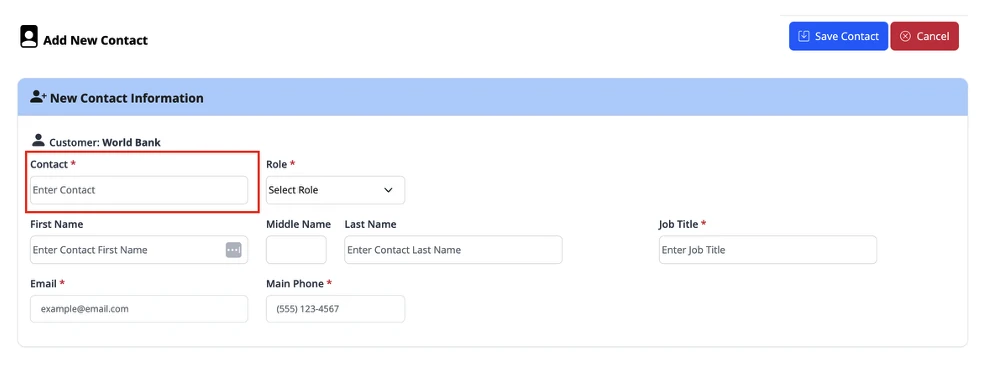
2.8.3.10 Validation client améliorée avec les détails du bon de livraison
Le processus de validation par le client a été amélioré pour inclure les informations de livraison lorsqu'un événement est marqué comme terminé et prêt pour validation. En plus de recueillir la signature du client, l'écran de validation affiche désormais les détails pertinents de la livraison, y compris les quantités et les descriptions des articles, offrant ainsi une visibilité accrue et une validation des produits livrés avant approbation.
Exemple d'informations affichées :

2.8.3.11 Amélioration de la validation de la date des événements des bons de travail
Les champs de date de début et de fin d'événement de la page Événement d'ordre de travail sont désormais restreints en fonction des dates de début et de fin de l'ordre de travail associé. Cette amélioration aligne l'expérience de l'événement d'ordre de travail sur le planificateur d'événements, garantissant que les dates des événements restent dans le délai valide de l'ordre de travail et aidant à prévenir les erreurs de planification.
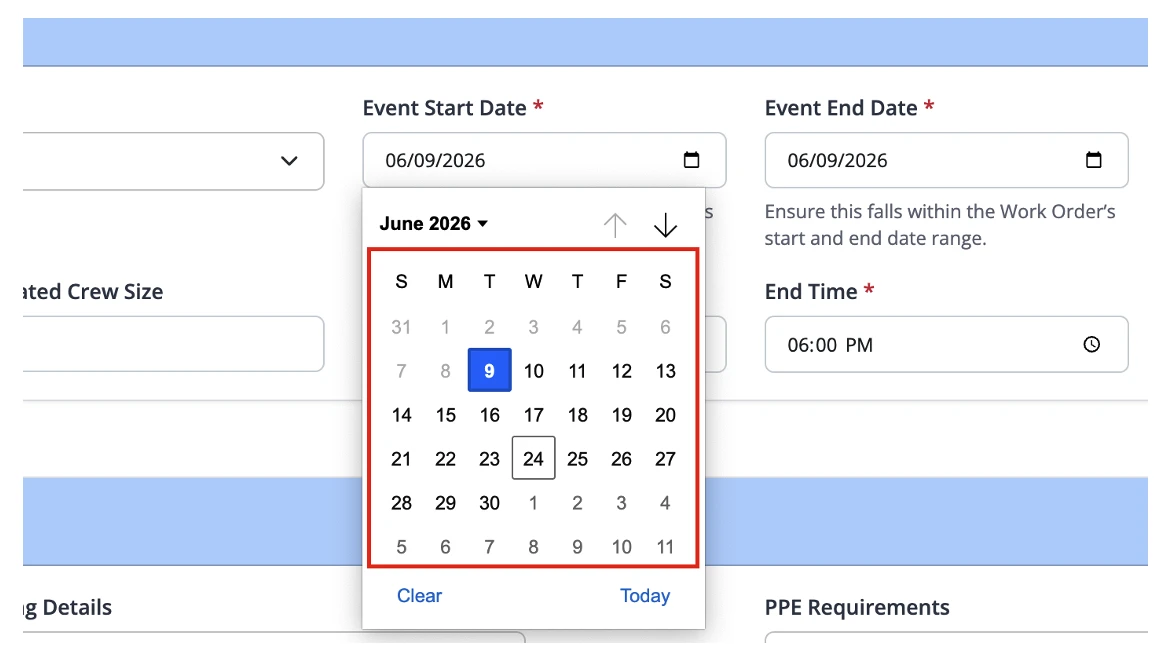
2.8.3.12 Messages de validation améliorés pour l'enregistrement des événements
Les messages de validation lors de l'enregistrement des événements ont été améliorés afin de fournir des retours plus clairs et exploitables lorsqu'un enregistrement ne peut pas être sauvegardé. Les utilisateurs recevront désormais des messages d'erreur contextuels qui identifient le problème de validation spécifique et aident à guider les actions correctives, réduisant ainsi la confusion et améliorant l'expérience globale de gestion des événements.
2.8.4 Intégration du bon de livraison
2.8.4.1. Informations sur le bon de livraison dans les événements d'ordre de travail [Concessionnaires STC]
Field Operations Pro a été amélioré pour prendre davantage en charge les processus de bons de livraison pour Revendeurs Steelcase en affichant les détails des lignes de commande client et les informations relatives aux livraisons directement dans les événements d'ordre de travail. Cette amélioration offre au personnel de terrain une meilleure visibilité sur les produits livrés et permet aux installateurs de vérifier les articles reçus avant de commencer les travaux d'installation.
Remarque : Cette fonctionnalité est actuellement disponible pour Revendeurs Steelcase uniquement.
2.8.5 Visibilité de la date d'arrivée de la demande
Les dates d'arrivée demandées sont désormais disponibles dans les vues des articles d'ordre de travail, ce qui donne aux équipes de projet une meilleure visibilité sur les délais de livraison et aide à coordonner les activités d'installation en fonction des arrivées de produits prévues.
2.8.6 Mappage des champs et configuration
2.8.6.1 Mappage de champs configurable

Les administrateurs peuvent désormais configurer les champs affichés dans les vues du planificateur et des éléments d'ordre de travail. Cela permet aux organisations d'adapter l'expérience utilisateur en fonction de leurs processus métier et de mettre en valeur les informations les plus pertinentes pour leurs équipes de terrain.
2.8.6.2 Intégrité des données de type d'événement
Des améliorations ont été apportées à la sélection du type d'événement pour garantir que seuls les types d'événements valides sont affichés lors de la création et de la gestion des événements. Cela améliore la cohérence des données et réduit la confusion des utilisateurs.
2.8.7 Gestion des dossiers et intégration SharePoint
2.8.7.1 Liaison de site SharePoint configurable

Les organisations peuvent désormais définir le site SharePoint utilisé par Field Operations Pro directement dans la configuration. Cela offre une plus grande flexibilité aux clients gérant plusieurs sites SharePoint et simplifie la configuration de la gestion des documents.
2.8.7.2 Synchronisation SharePoint améliorée
Plusieurs améliorations ont été apportées à la synchronisation des documents entre NetSuite, les flux de travail de l'application mobile et SharePoint. Le système gère désormais mieux la création de dossiers et la visibilité des fichiers pour garantir que les documents restent accessibles sur toutes les plateformes.
2.8.7.3 Prise en charge améliorée du nommage des dossiers
La validation du nom des dossiers a été élargie pour prendre en charge les caractères spéciaux couramment utilisés dans les conventions de nommage des clients. Cela améliore la compatibilité avec les normes de gestion de documents existantes et réduit les problèmes de création de dossiers.
2.8.8 Gestion des pointages
2.8.8.1 Accès plus rapide à la documentation
Les enregistrements de pointage incluent désormais des liens directs vers leurs dossiers d'images associés, permettant aux utilisateurs d'accéder rapidement aux photos et aux documents justificatifs sans avoir à naviguer manuellement dans les structures de dossiers.

2.8.8.2 Création simplifiée de poinçons
Les utilisateurs peuvent désormais créer des enregistrements de pointage sans exiger de numéro de ligne de commande client. Cela simplifie le processus de pointage et offre une flexibilité supplémentaire lors de la documentation des problèmes sur le terrain.
2.8.9 Gestion des ressources
2.8.9.1 Calcul des coûts du suivi du temps hebdomadaire
Les calculs des coûts réels ont été introduits dans le suivi hebdomadaire du temps, fournissant aux organisations des informations plus précises sur le coût de la main-d'œuvre. Cette amélioration favorise une meilleure analyse des coûts de projet et aide les équipes à mieux comprendre les dépenses liées aux ressources.
2.8.10 Contrôles administratifs
2.8.10.1 Commandes de notification par e-mail de l'état des événements

Une nouvelle option de configuration permet aux administrateurs d'activer ou de désactiver les notifications par e-mail automatisées déclenchées par les changements de statut d'un événement. Cela offre aux organisations un plus grand contrôle sur les flux de communication et aide à réduire le trafic de courrier électronique inutile si nécessaire.
Ce style tend à bien résonner auprès des clients car il explique la valeur commerciale derrière chaque amélioration au lieu de se contenter de décrire le changement technique.
2.9 Field Operations Pro [Application mobile]
2.9.1 Gestion des événements et planification
- Tri des événements amélioré pour afficher :
- Dates des événements les plus récents en premier.
- Événements survenant le même jour par ordre chronologique.
- Correction de la gestion des fuseaux horaires pour garantir que les heures de début et de fin des événements correspondent au fuseau horaire de l'appareil.
- Fonctionnalité de recherche de projets améliorée pour une récupération des projets plus rapide et plus précise.
- Navigation vers le lien de projet améliorée depuis les Événements.
2.9.2 Améliorations de la validation par le client
- Ajout de l'affichage de Numéros de ligne de commande d'achat lors de la validation par le client.

- Écrans de fin améliorés pour une meilleure ergonomie sur les petits appareils.
- Ajout des informations du bon de livraison au flux de travail de fin d'événement et de validation par le client.
- Stabilité de capture de signature améliorée pour éviter la navigation accidentelle et les mouvements d'écran pendant la signature.
- Les utilisateurs peuvent désormais sélectionner les articles spécifiques qui ont été livrés lors de la Déconnexion processus, permettant une confirmation de livraison plus précise.

2.9.3 Améliorations des photos et de la galerie
- Prise en charge du téléchargement ajoutée plusieurs photos simultanément depuis la galerie d'un appareil.

-
- Visibilité de la galerie de projets améliorée pour afficher systématiquement les photos au niveau du projet et de l'événement.
- Correction des problèmes empêchant l'affichage des photos de projets dans les galeries.
2.9.4 Améliorations de Punch
- Renommé Nom du punch à Titre accrocheur pour une meilleure clarté.
- Ajout de la prise en charge de l'affichage des numéros de ligne de commande d'achat dans les enregistrements Punch.
- Amélioration de la réactivité et de l'ergonomie de l'écran de pointage.
- Les utilisateurs peuvent désormais créer des enregistrements de pointage directement depuis le Plan d'étage ou manuellement à partir de Formulaire de perforation, offrant une plus grande flexibilité lors de la documentation des problèmes sur le terrain.

2.9.5 Ordres de modification et demandes de devis
- Ajout de l'option de restreindre la sélection des employés aux ressources affectées à l'ordre de travail.
- Amélioration de la réactivité des écrans de bon de modification et de demande de devis sur les appareils mobiles.
2.9.6 Notes et collaboration
- Visibilité des notes améliorée pour permettre l'accès aux notes de projets historiques pertinentes.

- Visibilité des notes corrigée pour les rôles administratifs et de gestion de projet.
- Les utilisateurs peuvent désormais créer, consulter et modifier des notes spécifiques aux événements directement depuis la page des événements de l'ordre de travail, ce qui facilite la saisie des instructions d'installation, des demandes des clients et d'autres détails importants de l'intervention sur site.

2.9.7 Correspondance des champs et cohérence des données
- Cohérence améliorée des valeurs de champs mappées entre le planificateur, les événements d'ordre de travail et l'application mobile.

- Amélioration de la cohérence des libellés des champs de téléphone entre l'expériences de Scheduler et l'application mobile.
2.9.8 Améliorations de l'expérience utilisateur
- Sauts de ligne et mise en forme préservés dans les champs de mémo et d'instructions.
- Navigation dans la grille améliorée en gardant les colonnes clés visibles lors du défilement.
- Correction des problèmes de rendu HTML pour garantir que le contenu s'affiche dans un format lisible.
- Amélioration globale de la réactivité et de la mise à l'échelle de l'écran sur :
- Déconnexion
- Punch
- Ordre de modification
- Écrans de demande de devis
2.9.9 Stabilité et fiabilité
- Correction des problèmes pouvant entraîner la fermeture inopinée de l'application lors de l'accès aux fonctionnalités liées au pointage.
- Gestion améliorée des recherches de projets, de la navigation dans les événements, des notes, des galeries et de la capture de signatures pour une expérience utilisateur plus fiable.
— FIN DES NOTES DE VERSION DE CFI SUITE™ 2026.1 — Pour toute question, veuillez nous envoyer un e-mail à cfi@erpsuccesspartners.com.
>> RETOUR À LA PAGE DES MISES À JOUR
TABLE DES MATIÈRES