
CFI Suite™ 2025.2 Release Notes
Notes importantes
Les améliorations et modifications de la version 2024.2 énumérées dans ce document peuvent ne pas être disponibles pour tous les clients jusqu'à ce que leur mise à niveau soit finalisée. Votre accès à ces fonctionnalités et applications est soumis aux conditions de service de votre contrat NetSuite et de votre contrat ERP Success Partners. Certaines fonctionnalités peuvent nécessiter un achat supplémentaire.
Déclaration de confidentialité
Ce document contient des informations exclusives et confidentielles de ERP Success Partners Inc. fournies dans le seul but de permettre au destinataire d'évaluer les informations relatives à l'utilisation de CFI Suite™ et à ses questions connexes. En contrepartie de la réception de ce document, le destinataire accepte de maintenir ces informations strictement confidentielles et de ne pas les reproduire, les divulguer ou les distribuer à quiconque en dehors du groupe directement responsable de l'évaluation de son contenu, sans l'autorisation écrite expresse de ERP Success Partners Inc. L'utilisation ou la divulgation de ce document, en tout ou en partie, à des fins autres que la poursuite d'une relation d'affaires avec ERP Success Partners Inc. est expressément interdite. Tout destinataire de ce document qui n'est pas disposé à accepter ces restrictions doit renvoyer ce document et les autres documents envoyés en addendum qui sont la propriété de ERP Success Partners Inc. et qui sont joints électroniquement ou qui font partie des annexes, sans en examiner le contenu ni en faire une distribution ultérieure. L'examen de ce document vaut acceptation des restrictions susmentionnées.
Liste des versions du produit
| SuiteApp Name | Numéro de la dernière version |
| Line Import Tool (LIT) | 25.2.0 |
| Multi Line Edit Tool (MLET) | 25.2.0 |
| PDF Builder | 25.2.0 |
| Ordres de modification | 25.2.0 |
| Order Adjustments | 25.2.0 |
| PO Breakout Group | 25.2.0 |
| Connecteur Haworth | 25.2.0 |
| Field Ops Pro | 25.2.7 |
| Demande d'information | 25.2.1 |
| Direct Bill | 25.2.0 |
Avis important :
This document covers the release information relevant to CFI Suite™ only. All customers should be upgraded to NetSuite 2025.2 before being upgraded to CFI Suite™ 2025.2 to ensure a seamless upgrade transition. More information regarding the features released by NetSuite can be found ici.
1.0 CFI Suite™ Updates
1.1 Line Import Tool (LIT)
1.1.1 Updated CFI Catalog User Interface (UI)
Une nouvelle CFI Catalog UI has been introduced, along with support for rendering CFI Catalog images directly on NetSuite line items. This update enhances usability and provides immediate visual context during transaction entry and review.
An alert has been set to notify the user when the rate changes after specifying from the CFI Catalog.

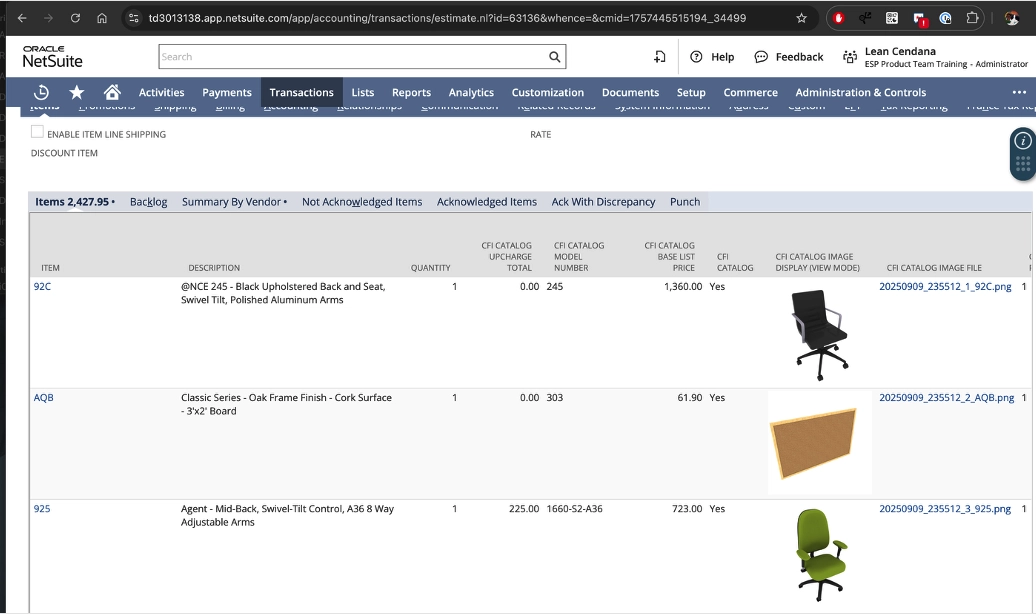
An alert has been set to notify the user when the rate changes after specifying from the CFI Catalog.

1.2 Multi Line Edit Tool (MLET)
1.2.1 Saved Adjusted Column Layout
The application now allows users to save their column layout. Any changes to column position, width, pinning, sorting, or visibility (hidden columns) are saved and automatically restored the next time you open the MLET form.
A ‘Reset Columns’ option has been introduced, which enables users to quickly restore the default column layout whenever needed.

1.3 PDF Builder
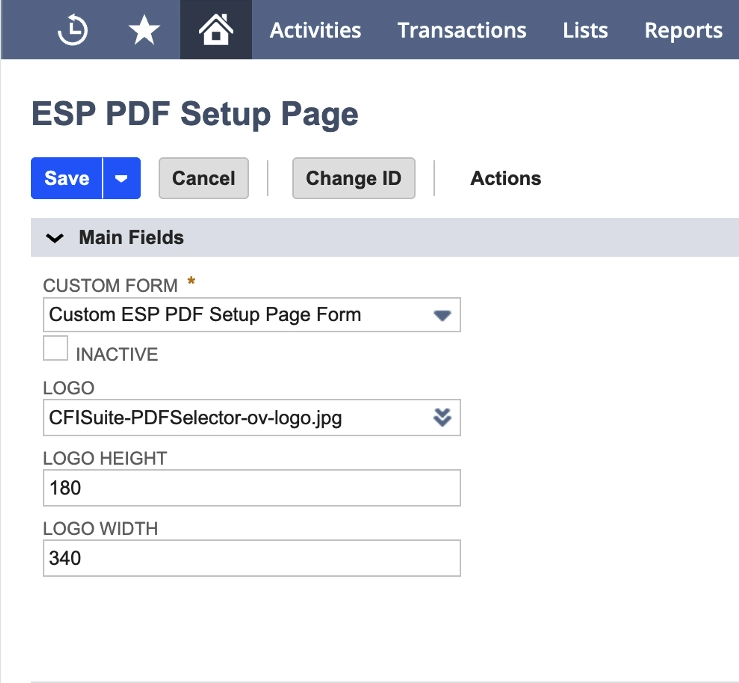
1.3.1 Logo Adjustment in PDF Builder
A new configuration control has been added under PDF Builder Setup, allowing users to specify the width and height of the logo in generated PDFs. This provides greater flexibility in branding compliance and ensures consistent presentation across documents.
1.3.2 Column Width Control in PDFs
A new feature has been added to allow users to control the width of each line field in PDFs. On the layout selection page, when a field is selected, users can now specify its width, enabling precise customization of PDF layouts.

1.3.3 Print Images from Line Items
A new feature has been added allows users to print images directly from line items, providing visual references in printed documents. This ensures that item details are clearly represented, improving accuracy and clarity in documentation.
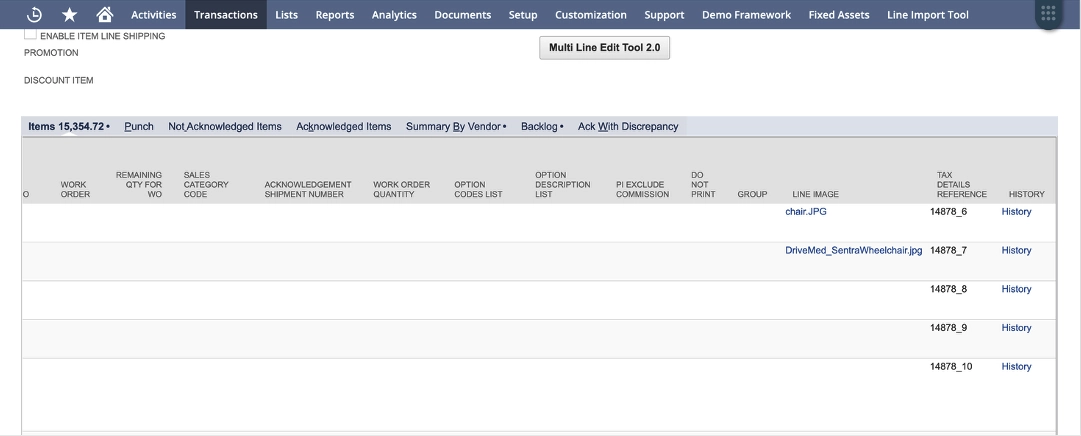
A Sample output of the PDF with line-item images is displayed below:

1.4 Change Orders
1.4.1 Informative Banners
This update introduces clear, actionable error messages when Change Order creation fails, along with a success confirmation banner when the process completes successfully. These enhancements improve process transparency and give users immediate visibility into the transaction status.
Key Scenarios Covered:
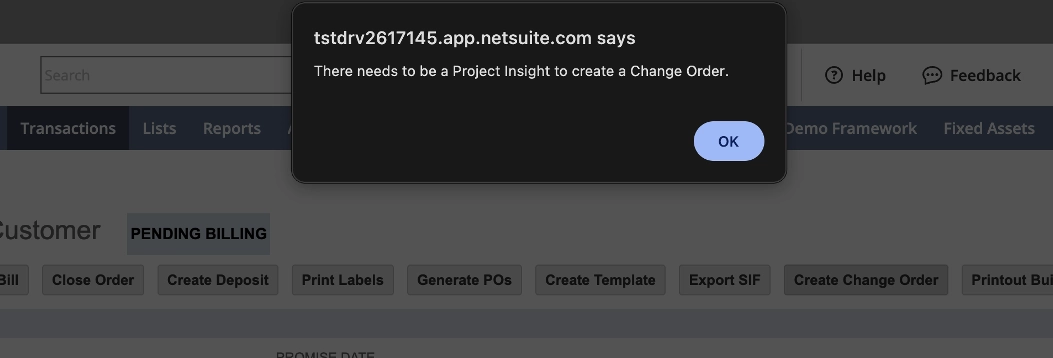
- An error message is displayed when a Change Order is not successfully created
- An error message is displayed when an unexpected error occurs during Change Order creation
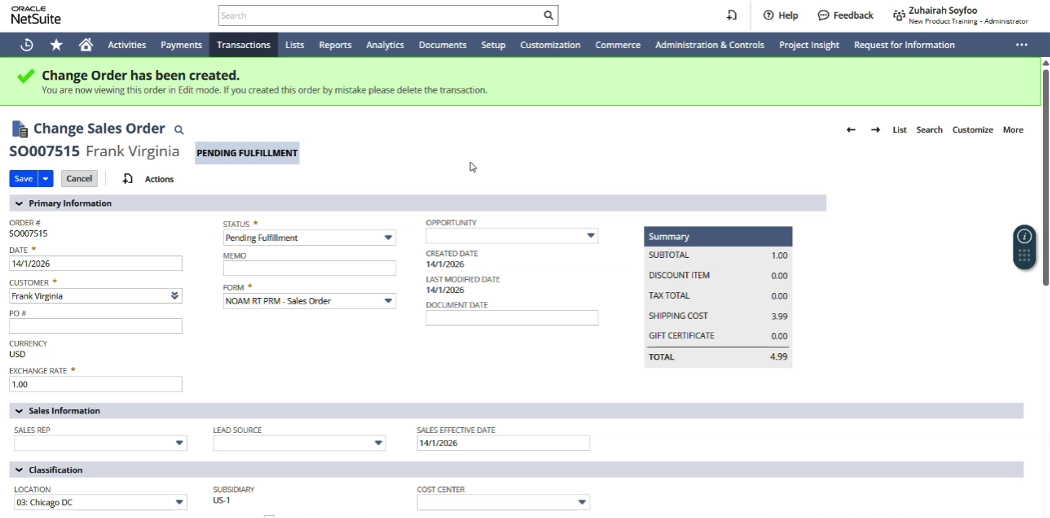
- A success banner is displayed when a Change Order has been created

An error message is displayed when there is no Project Insight on the Sales Order:
Below is an example of the success banner displayed after a Change Order is successfully created:
1.4.2 Change Order Reason – Role-Based Editability
The Change Order Reason field is now editable based on user role. This enhancement strengthens governance and data integrity by ensuring that only authorized roles can modify the reason associated with a Change Order, while preserving visibility for all relevant users.

1.5 Order Adjustments
1.5.1 Feature Flag – Prevent Sync When Vendor Prepayment Exists on Related PO
A new configuration control has been introduced under ESP | CFI Order Adjustments Settings, allowing administrators to govern syncing behavior when a Purchase Order (PO) has an associated Vendor Prepayment. This capability enables tighter financial controls and greater accuracy in transaction management.
New Setting
Checkbox: Allow Sync if Purchase Order has Vendor Prepayment

Functional Behavior
When the checkbox is enabled:
- Users can activate the Will Sync to PO checkbox even if the related PO contains a Vendor Prepayment record.
- Users can input a PO value in the Add to Existing PO column regardless of existing Vendor Prepayment linkage.
When the checkbox is handicapé (default behavior):
- If the PO has an associated Vendor Prepayment, the system will prohibit:
- Enabling Will Sync to PO
- Entering a PO in the Add to Existing PO field
- Users will receive an alert notification indicating that sync actions are not permitted due to the Vendor Prepayment constraint.
- For any Sales Orders where Will Sync to PO has been enabled, saving the Sales Order will reset Will Sync to PO to false to prevent the line from being included in the synchronization process.
- If the Will Sync to PO has been enabled, and the user moves into the Order Adjustment page, the background scripts will not process the Purchase Order with Vendor Prepayment and/or Vendor Bill.
1.5.2 Line Number Added to Results Tables
To improve traceability and streamline reconciliation activities, a Line Number field has been added across key results tables within the Order Adjustment Suite (OAS).
Updated Areas
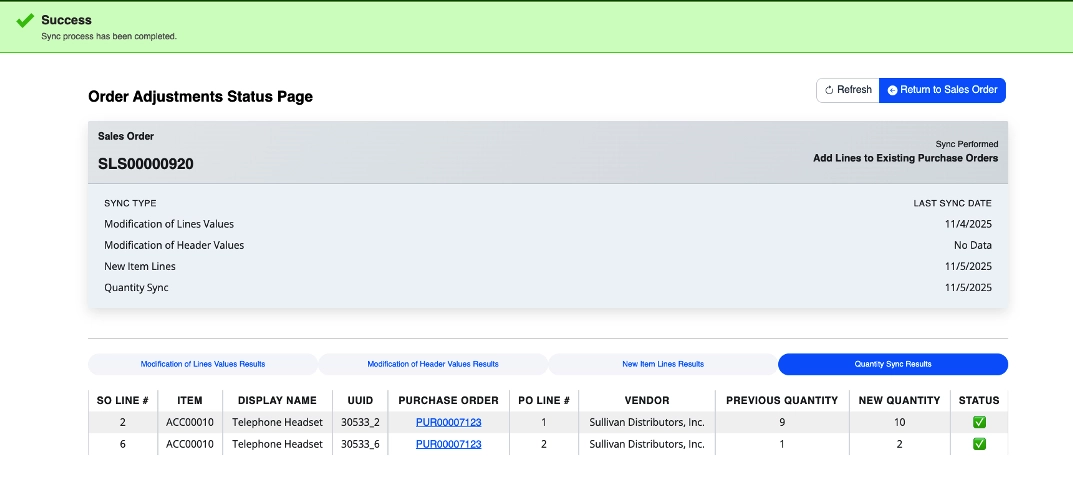
The Line Number column is now visible in the following results pages:
- Qty Sync Results
- Line Sync
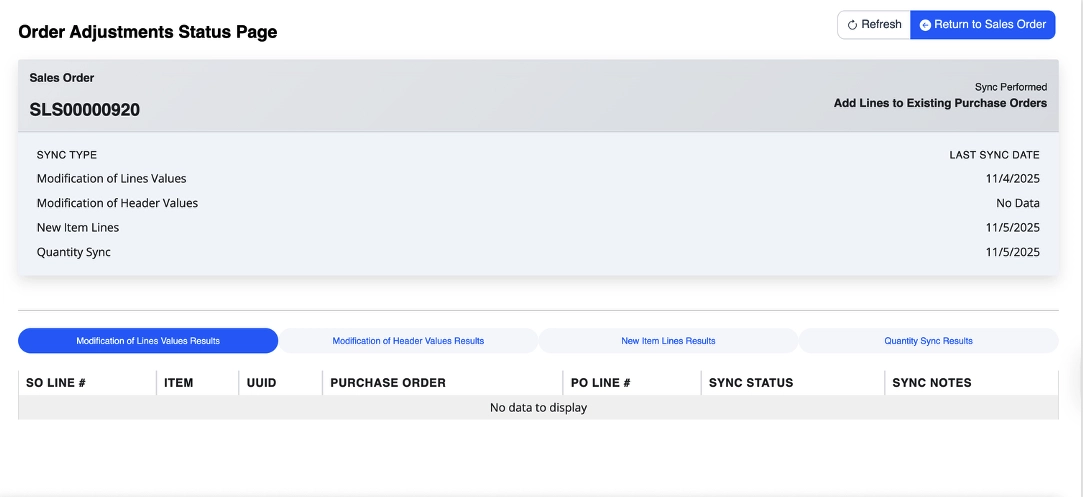
- Add New Lines

Functional Behavior
- Each line item displayed in the results tables will now include a corresponding Line Number, aligned with the originating transaction.
- This enhancement provides users with clearer mapping between original PO lines and system-generated sync or adjustment outputs.
- Les Line Number field is displayed by default on the Status page and sources its value from the field defined in Default Item Line Number Field within the Settings page.
- If no field is specified in Settings, the system will automatically default to the CFI Line Number
1.6 PO Breakout Group
1.6.1 Prevent PO Creation for Generic Vendors
When this feature is enabled, the system will prevent the creation of Purchase Orders for the generic vendor defined in the Default Vendor field within LIT settings.

This is a feature flag that can be enabled from the PO Breakout Settings page.

During the PO break process, any transactions for this vendor are automatically skipped.
1.7 Haworth Connector
1.7.1 Enhanced Partner-Customer Sync
This enhancement improves how partners are matched to customers by using smarter name and address comparisons.
The system now compares full address details, including street numbers and complete address lines, and automatically standardizes common address terms (such as Street, Avenue, Road, Boulevard, and directional indicators like North or South) to improve accuracy. Addresses are also cleaned to remove extra characters and formatting differences.
Name matching has been enhanced to recognize close matches, even when names are formatted differently. The system can now identify matches based on partial names, reordered words, spacing differences, and high similarity between names.
As a result, partner and customer records are matched more accurately and consistently, reducing manual corrections and improving data synchronization.
Examples:
- Address matching
- “123 Main St.” → “123 Main Street”
- “456 N. Park Ave, Suite 200” → “456 North Park Avenue Ste 200”
- “789 Broadway Blvd.” → “789 Broadway Boulevard”
- Name matching
- “ABC Logistics” → “ABC Logistics LLC”
- “Smith John” → “John Smith”
- “AcmeCorp” → “Acme Corp”
- “Gloabl Solutions” → “Global Solutions” (typo match)
1.7.2. Complete Acknowledgement Recording
The integration now maintains the complete acknowledgement history. This includes the original acknowledgement as well as all net change records.
- Provides full visibility into acknowledgement activity from start to finish.
- Ensures no acknowledgement data is lost or overwritten.
- Makes it easier to understand how and when acknowledgements change.
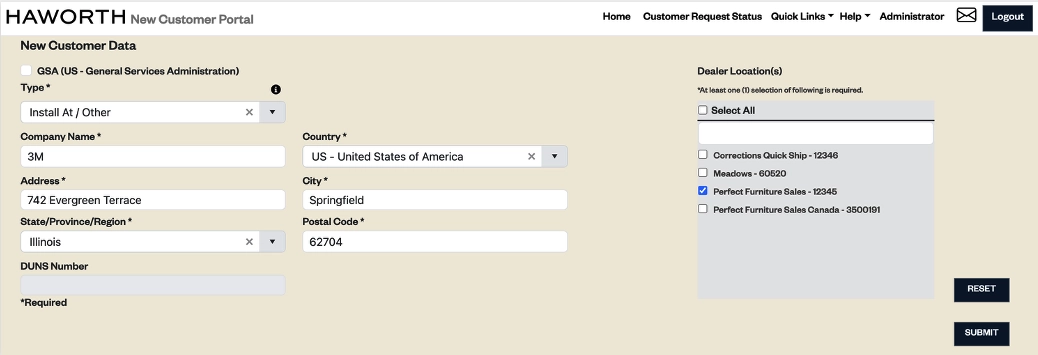
1.7.3. New Haworth Partner Customer Integration
Users can now select a specific address from the NetSuite customer record when submitting a new partner request. The selected address details will automatically populate in Haworth’s new Partner Request system, streamlining data entry, and ensuring accurate request submission.
Key highlights:
- New Submission Button: A dedicated button has been added to the customer record to trigger address submission.

- Default Shipping Address: The integration captures data from the customer record’s Default Shipping address.

- Seamless Data Transfer: Address information is passed directly to the Haworth New Customer Portal, ensuring accurate and efficient request creation.
1.8 Request for Information (RFI)
1.8.1 Button Hide Control on Opportunity and Quote Records
A new checkbox has been added under RFI Auto-Default Configuration that allows users to hide specific buttons on Opportunity and Quote records. This provides greater flexibility in tailoring the user interface to match business workflows and reduce interface clutter.

1.9 Direct Bill
1.9.1 Direct Bill Columns Refactor
Les Direct Bill columns have been refactored and simplified:
- Deprecated the Include DSF Fee et Vente directe de billets columns
- Updated the Facture directe option list and refined its functionality
- Added tooltip information in the column header for improved clarity

Impact sur les entreprises :
- Streamlines the Direct Bill interface for easier use
- Reduces confusion by eliminating redundant or unnecessary fields
- Provides guidance through tooltips, improving data accuracy and reducing errors
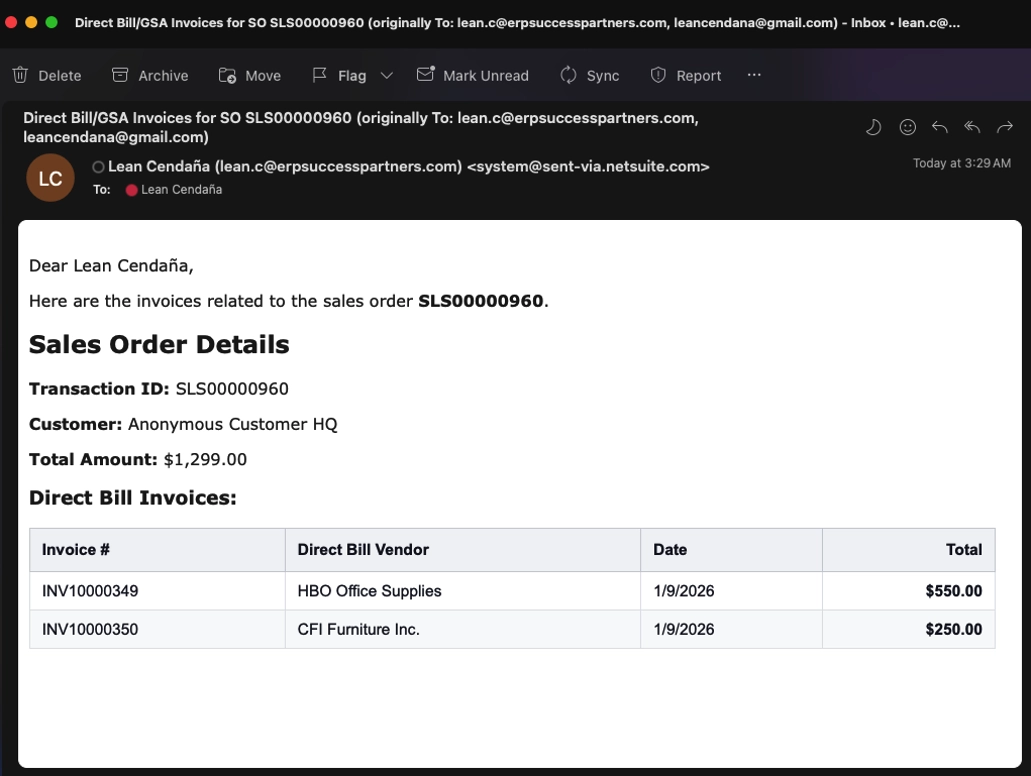
1.9.2 Automated Direct Bill Email Summary
A new feature automatically sends a customizable email summary upon completion of the Direct Bill process. Users can configure the content and recipients of the email to align with business requirements.

A sample email is displayed below:
1.9.3 Configurable Direct Bill Email Template
This version now supports a configurable email template for Direct Bill summaries, allowing users to customize the sender, recipients, and content of the email.

1.9.4 Added Original Sell Field on Invoice Item Sublist
A new Original Sell (Original SO Sell) field has been added to the Invoice Item sublist to provide better visibility into the related Sales Order pricing. This enhancement improves traceability between invoices and their source Sales Orders, enabling teams to reference original sell values more efficiently.
A sample invoice transaction is displayed below:

— END OF CFI SUITE™ 2025.2 RELEASE NOTES — For any questions, please email us on cfi@erpsuccesspartners.com.
TABLE DES MATIÈRES